Saltar para o conteúdo
Consultoria · Automação · Dados · Digital

Category Archive vbcode

Enviar email quando Data de Envio for igual a Data Actual

Pretende-se com este código que quando a Data de Envio for igual a data em que nos encontramos é enviado um email ao destinatário.

O código pesquisa todos os registos e envia para cada email onde a condição da data for a data actual.

SendEmailonDate-300x161 Enviar email quando Data de Envio for igual a Data Actual
Código:
Public ws As Worksheet
Public iCount As Integer    ‘ String used to count exist records
Public lastrow As Long      ‘ String used to detect last used row to add next record
Private Sub cmdAdd_Click()
Dim TClientID As Integer
    
     iCount = Application.WorksheetFunction.CountIf(Range(“A1:A10000”), “C*”)
   
    With ws.UsedRange
        lastrow = .Rows(.Rows.Count).Row
    End With
    
    TClientID = ws.Range(“A” & lastrow).Value
    
    ‘Select new row to add record
    ws.Range(“A” & lastrow + 1).Select
    
    Me.Repaint
    Populate_Fields
    ‘Add next number to record
    Me.txtClientID = TClientID + 1
    
End Sub
Private Sub cmdClose_Click()
Application.DisplayAlerts = False
ActiveWorkbook.Save
Application.Quit
End Sub
Private Sub cmdSave_Click()
ActiveCell.Offset(0, 0).Value = Me.txtClientID.Text
ActiveCell.Offset(0, 1).Value = Me.txtName.Text
ActiveCell.Offset(0, 2).Value = Me.txtOrderedDate.Text
ActiveCell.Offset(0, 3).Value = Me.txtSendDate.Text
ActiveCell.Offset(0, 4).Value = Me.txtProduct.Text
ActiveCell.Offset(0, 6).Value = Me.txtEmail.Text
ActiveCell.Offset(0, 7).Value = Me.txtcontact.Text
MsgBox “Document Saved!”, vbOKOnly
End Sub
Private Sub cmdSendEmail_Click()
    Dim ws As Worksheet
    Dim oApp As Object, MailApp As Object, SendMail As Object
    Dim strbody As String
    Dim deldate As Variant
    Dim email As Variant
    Dim i As Integer
    
    Set ws = Worksheets(“sheet1”)
    ws.Select
      
    ‘Set numrows = number of rows of data.
     NumRows = Range(“A2”, Range(“A2”).End(xlDown)).Rows.Count
     
    ‘ Select cell A2
    Range(“A2”).Select
    
    ‘Get Delivery date
    lin = 2
    col = 4
    deldate = ws.Cells(lin, col).Value
    
    ‘Get email
    lin = 2
    col = 7
    email = ws.Cells(lin, col).Value
    ‘ -1 because sheet have header
    For i = 1 To NumRows – 1
    
            If deldate = Date Then
    
                ‘Create Email
                Set MailApp = CreateObject(“Outlook.Application”)
                Set SendMail = MailApp.CreateItem(0)
                ‘Conteudo corpo da mensagem
                strbody = “Your require thing has been delivered … ” & vbNewLine & vbNewLine & _
                          “Thanks” & vbNewLine & _
                          “…”
        
                On Error Resume Next
                With SendMail
                    .To = email   ‘<- Email to send
                    .CC = “”
                    .BCC = “”
                    .Subject = “Your require thing has been delivered …”
                    .Body = strbody ‘<- Body message
                    .Send ‘ .Display <- Before send email to client show
                             ‘ .send <- Send Email direct
                End With
                Else: Exit Sub
            End If
            ActiveCell.Offset(lin + i, 0).Select
            deldate = ws.Cells(lin + i, 4).Value
            email = ws.Cells(lin + i, 7).Value
    Next
         
    
End Sub
Private Sub UserForm_Initialize()
Set ws = Worksheets(“sheet1”)
Range(“A2”).Select
Populate_Fields
End Sub
Private Sub Populate_Fields()
Set ws = Worksheets(“sheet1”)
ws.Select
ActiveCell.Offset(0, 0).Select
Me.txtClientID.Text = ActiveCell.Offset(0, 0).Value
Me.txtOrderedDate = ActiveCell.Offset(0, 2).Value
Me.txtSendDate = ActiveCell.Offset(0, 3).Value
Me.txtName = ActiveCell.Offset(0, 1).Value
Me.txtProduct = ActiveCell.Offset(0, 4).Value
Me.txtEmail = ActiveCell.Offset(0, 6).Value
Me.txtcontact = ActiveCell.Offset(0, 7).Value
End Sub

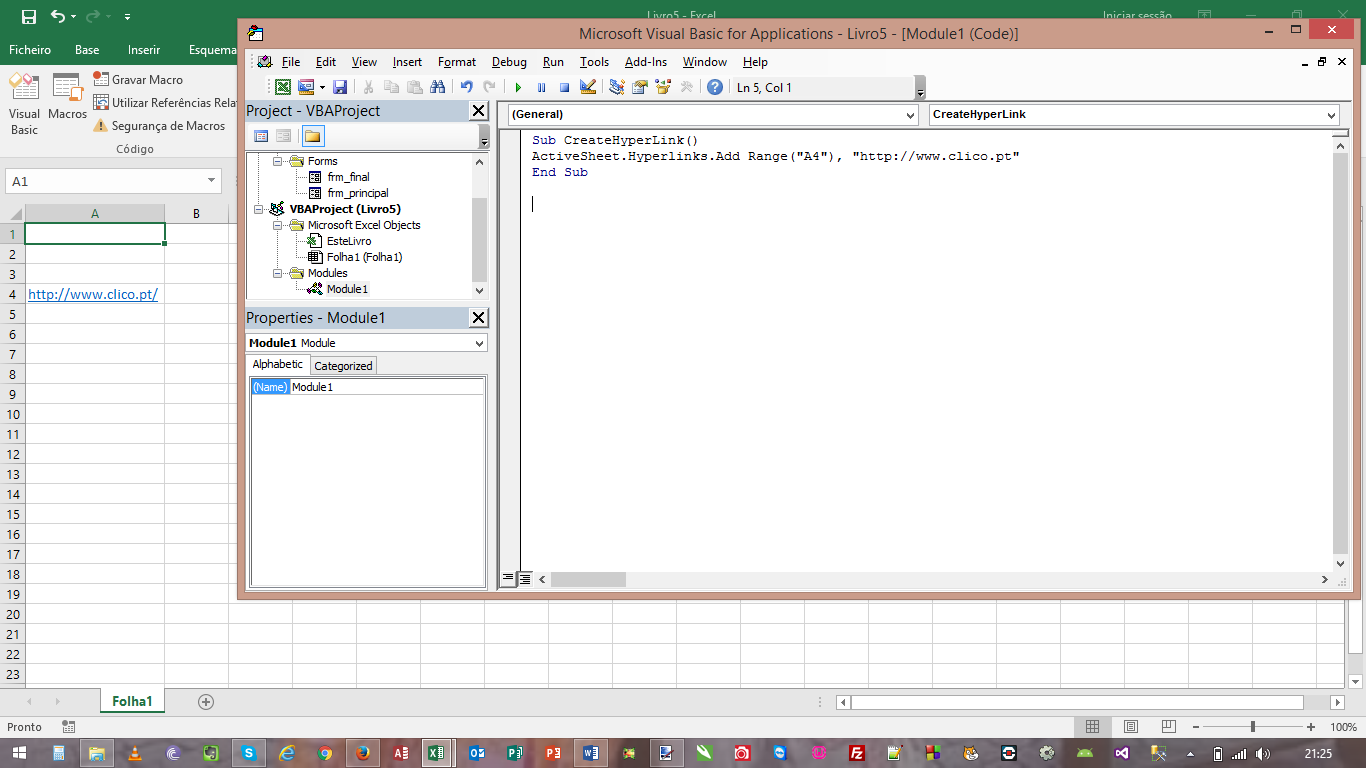
Criar Hiperlinks com VBA Excel

Criar Hiperlinks com VBA Excel:

1. Abra uma folha de Excel
2. Carregue em Alt+F11 para abrir o editor de VBA
3. Insira um novo módulo
4. Copie o código que se segue e cole na janela de codigo
5. Carregue em F5 para executar
6. Verifique que o link foi adicionado a célula A4

Create Hiperlinks with Excel VBA;
1. Open an excel workbook
2. Press Alt+F11 to open VBA Editor
3. Insert a New Module
4. Copy the above code and Paste in the code window
5. Press F5 to execute it
6. You can see a new hyperlink is added at A4

Sub CreateHyperLink()
ActiveSheet.Hyperlinks.Add Range(“A4”), “https://clico.pt/
End Sub

_CRIAR_LINK Criar Hiperlinks com VBA Excel

Enviar Emails com ficheiro comprimido como anexo quando estiver na Data Actual (VBA)

Pretende-se com este código que quando a Data de Envio for igual a data em que nos encontramos é enviado um email ao destinatário.

O código pesquisa todos os registos e envia para cada email onde a condição da data for a data actual.

ZIP_EMAIL-300x188 Enviar Emails com ficheiro comprimido como anexo quando estiver na Data Actual (VBA)
ZIP_EMAIL_2-300x183 Enviar Emails com ficheiro comprimido como anexo quando estiver na Data Actual (VBA)
ZIP_EMAIL_1-300x156 Enviar Emails com ficheiro comprimido como anexo quando estiver na Data Actual (VBA)

VBA Code/Macro:

Sub SendEmail()

Dim ws As Worksheet
Dim oApp As Object, MailApp As Object, SendMail As Object
Dim strbody As String
Dim deldate As Variant
Dim email As Variant
Dim i As Integer

Set ws = Worksheets(“sheet1”)
ws.Select

‘Set numrows = number of rows of data.
NumRows = Range(“A2”, Range(“A2”).End(xlDown)).Rows.Count

‘ Select cell A2
Range(“A2”).Select

‘Get Delivery date
lin = 2
col = 4
deldate = ws.Cells(lin, col).Value

‘Get email
lin = 2
col = 7
email = ws.Cells(lin, col).Value
‘ -1 because sheet have header
For i = 1 To NumRows – 1

If deldate = Date Then

‘Create Email
Set MailApp = CreateObject(“Outlook.Application”)
Set SendMail = MailApp.CreateItem(0)
‘Conteudo corpo da mensagem
strbody = “Your require thing has been delivered … ” & vbNewLine & vbNewLine & _
“Thanks” & vbNewLine & _
“…”

On Error Resume Next
With SendMail
.To = email ‘<- Email to send
.CC = “”
.BCC = “”
.Subject = “Your require thing has been delivered …”
.Body = strbody ‘<- Body message
.Send ‘ .Display <- Before send email to client show
‘ .send <- Send Email direct
End With
Else: Exit Sub
End If
ActiveCell.Offset(lin + i, 0).Select
deldate = ws.Cells(lin + i, 4).Value
email = ws.Cells(lin + i, 7).Value
Next

End Sub

Show Buttons
Hide Buttons